Creating a FotoMedley Watercolor Painting Gift
Have you ever wanted to give a one-of-a-kind gift? FotoMedley's Watercolor Painting style can turn a favorite photo into soft, hand-painted artwork that is ready to download, print, frame, or use as the starting point for a personal craft project.
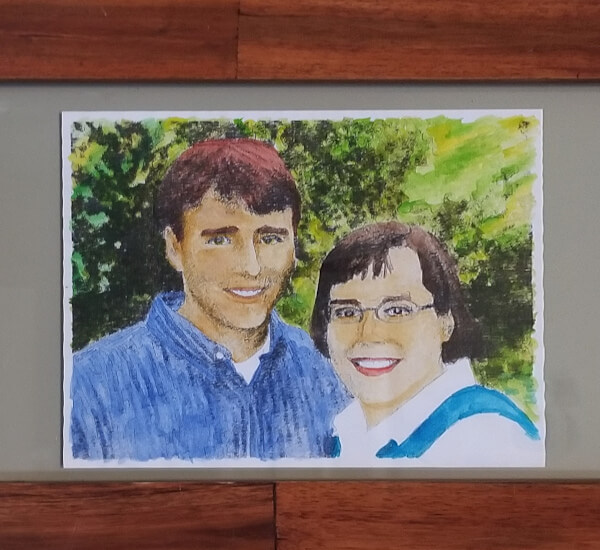
With just a little watercolor kit, you can turn your memories into framed art.
This tutorial follows the current Style Lab flow: upload a photo, wait for verification, choose Watercolor Painting, generate the result, and save the creation you like best.
Choose the Watercolor Painting Style
Start by heading to the FotoMedley Watercolor style page to understand the finished look, then open Style Lab with the style ready to select.
For this tutorial, use Watercolor Painting, which produces a soft painted look with blended color and restrained brush texture. If you prefer a more structural black-and-white base, the Pencil Sketch style also works beautifully as a drawing base.
Upload Your Image
In Style Lab, start on the Inputs step. Choose the collection you want to work in, then click Upload Image, drag a file into the upload area, paste an image from your clipboard, or select a photo from your device.
For this gift workflow, portraits, pets, homes, wedding photos, and family snapshots all work well. Upload the image into Default Collection or into a named collection such as Anniversary Gift or Family Watercolors.
- Use high resolution photos — at least 1200px wide
- Good lighting with even exposure produces cleaner painted detail
- Portraits and clear subjects tend to work better than complex busy scenes
- Avoid very dark, heavily filtered, or low-contrast photos
After upload, FotoMedley verifies and analyzes the image. While that is happening, the image card may show a spinner and the Process step may ask you to wait. Once the card is selectable, choose it and continue to the Style step.

Generate and Save the Result
The Process step summarizes your selected source, the Watercolor Painting style, and the total credit cost. Click Confirm & Generate when everything looks right.
Head to your creations from the success screen to review the finished output. The processing view also shows Source and Result side by side, so it is easy to compare the new watercolor against the original.
Use the download button on the finished result when you want the image file. From there, print it at home, send it to a print shop, add it to a card, or keep it as a digital gift.
Turn It Into a Gift
Now decide how personal you want the final piece to be. You can frame the downloaded watercolor as-is, print it on textured paper, add a handwritten note, or lightly paint over the print with watercolor pencils or markers.
For a handmade version, print the result first and use it as a guide. The soft rendered color gives you a base to follow without forcing you to draw the scene from scratch.
A perfect gift idea
This works beautifully as a gift for weddings, anniversaries, Mother's Day, or any occasion where a personal, heartfelt touch matters. Children especially love seeing themselves turned into art!
Do not be afraid to create a few variations. Keep the strongest watercolor in a dedicated collection, then download the version that feels most gift-worthy.
Ready to create your own?
Start a fresh Style Lab session with Watercolor Painting selected.
Start Creating