Your First Style Lab Project, Start to Finish
A first FotoMedley project is easiest when you know what each screen is asking for. This guide follows the current Style Lab flow from a blank collection to a finished creation you can download, organize, or use again.
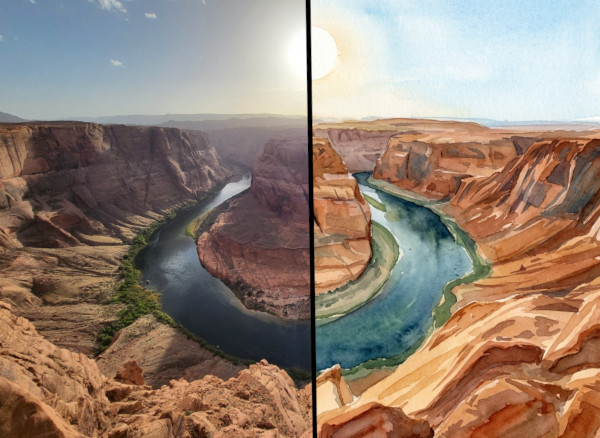
A source photo becomes a finished creation after you choose inputs, style, settings, and processing.
Think of Style Lab as a guided checkout for image processing. You choose the source images, pick the style, review any available settings, then confirm the batch before FotoMedley spends credits and generates results.
Start With a Collection and a Source Image
Open Style Lab and begin on the Inputs step. If you are signed in, the active collection matters: it controls where new uploads land and which existing uploads or creations you can choose from. Default Collection is fine for a quick test, but a named collection such as “Birthday Photos,” “Pet Portraits,” or “First Style Lab Test” keeps the project easier to find later.
Add your first source with Upload Image, drag and drop, paste from your clipboard, or the device picker. Signed-in accounts can build a batch from multiple images; guest sessions are intentionally simpler and start with one image.
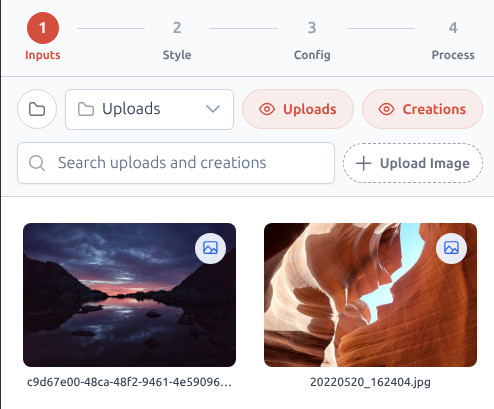
Wait for Verification, Then Select Sources
FotoMedley verifies and analyzes every upload before it can be processed. During that short wait, the card can show a spinner overlay, and the Process step may tell you the image is still being uploaded or analyzed. That is normal; Style Lab is waiting until the source is ready.
When the card becomes selectable, click it. Selected cards get a red border and a check mark, and the footer updates with the selected image count. If a file is rejected, the card is marked Rejected and it stays out of the processing batch.
- Use a clear subject with good lighting.
- Avoid very dark, blurry, or heavily filtered images for your first run.
- Try one or two images before processing a full batch.
Pick a Style That Matches the Job
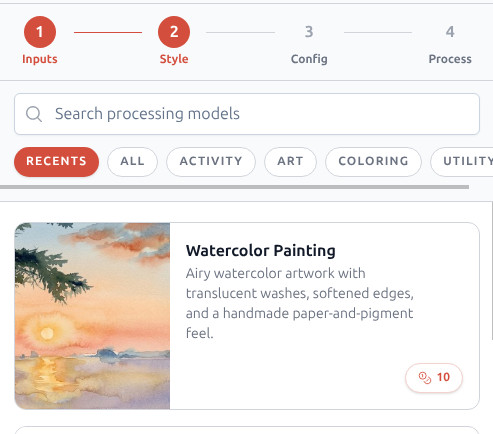
On the Style step, use Search processing models if you already know the style name, or browse with the category chips. Each card gives you the name, preview, and credit cost before you move forward, so you can compare a practical option like Background Removal against a more decorative option like Watercolor Painting or Comic Book Halftone.
For a first project, choose a style with an obvious goal. Coloring Page is good when you want a printable outline. Background Removal is good when the subject needs to stand alone. Watercolor Painting is good when the photo already has a keepsake or gift feeling.
Review the Style Configuration
Some styles go directly to Process. Others include a Config step with choices that affect the final file. Coloring-page workflows can show Page processing layout choices such as Auto, Portrait, and Landscape. Styles with resolution controls can offer Low, Medium, and High output tiers, with Creative Pro requirements clearly marked when they apply.
If you are unsure, leave layout on Auto for the first run and choose the resolution that matches the job. Low is enough for a quick experiment, Medium is a good general-purpose choice, and High is the option to look for when the finished result needs to print cleanly or be reused in another project.
A calm first-run setup
One selected image, one clearly named style, Auto layout when it is offered, and a middle resolution is the easiest way to learn what the style does before spending time on a larger batch.
Confirm the Batch and Review the Result
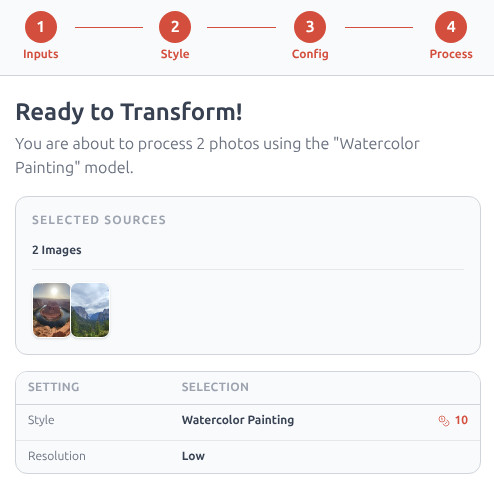
The Process step is the final checkpoint. It summarizes your selected sources, the style, the configuration, and the total credit cost. Read this screen before clicking Confirm & Generate, especially when you have selected more than one image.
As the batch runs, Style Lab shows each Source and Result together. When it completes, use View Creations to open the finished outputs, download the ones you need, or select a result later as the source for another style.
Ready to try Style Lab?
Start with one image, one style, and the default configuration. You can get more ambitious after you see the first result.
Open Style Lab